Overview
The goal of this project was to make the physical side of the home lab more organized and closer to the way infrastructure is documented in a professional environment. Networking, virtualization, Linux, client hardware, and rack power were consolidated into one cabinet, and physical devices were assigned consistent host and device names.
Rack Environment
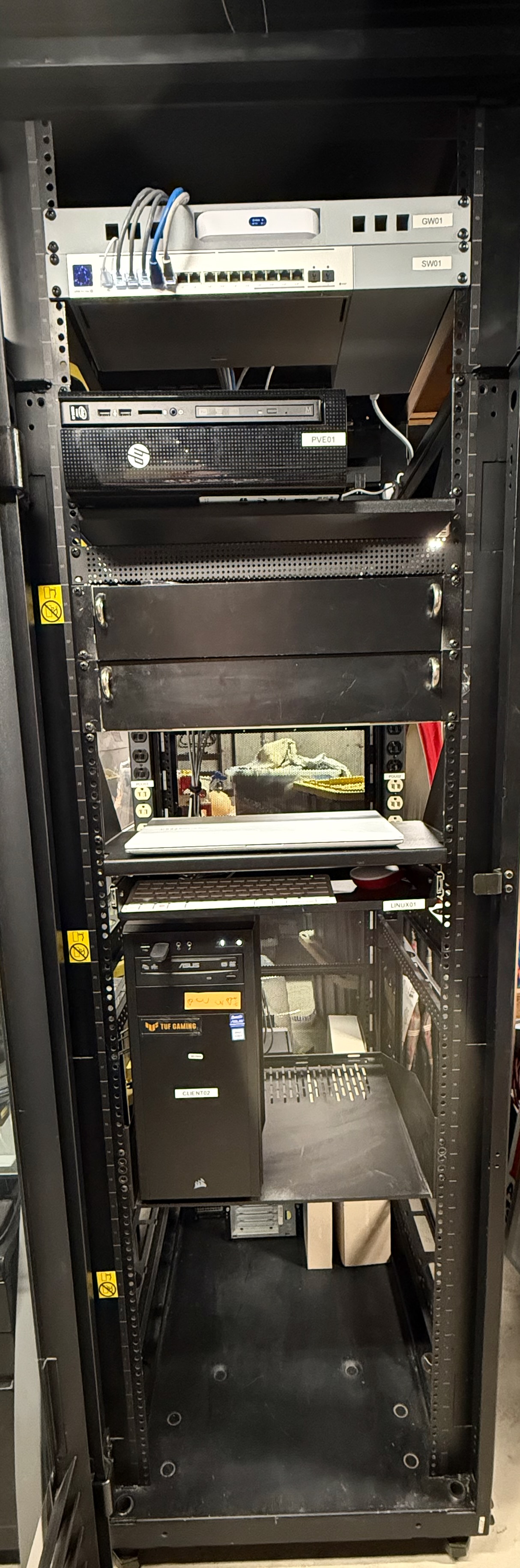
Device Naming and Inventory
- GW01 — UniFi Cloud Gateway Max
- SW01 — UniFi managed switch
- PVE01 — Proxmox VE virtualization host
- LINUX01 — Linux system used for lab administration and testing
- CLIENT02 — Physical client/workstation
- DC01 — Windows Server domain controller VM hosted on PVE01
- CLIENT01 — Windows 11 domain client VM hosted on PVE01
Physical devices are labeled on the rack, while virtual machine names are documented logically under the Proxmox host. This keeps the physical and virtual layers distinct while making troubleshooting and documentation easier.
Implementation
- Installed and positioned the enclosed server/network rack in the home lab.
- Migrated networking, compute, Linux, and client equipment into the cabinet.
- Organized vertical rack power distribution and device power connections.
- Assigned consistent device names and added physical labels to key equipment.
- Improved cable routing and kept the layout accessible for maintenance and future changes.
- Documented the relationship between the physical Proxmox host and the virtual machines running on it.
Why This Matters
The rack adds a physical-infrastructure layer to the lab. In addition to configuring software and virtual systems, I can practice equipment organization, rack access, cable tracing, device identification, physical troubleshooting, power awareness, and repeatable documentation.
Next Steps
- Continue improving cable management and labeling on both ends of critical connections.
- Document switch-port assignments and device-to-port relationships.
- Add additional rack-mounted compute or storage hardware as the lab expands.
- Continue integrating the rack with Proxmox, Windows Server, UniFi, and automation projects.